

Home › Speedo One › Work Tracker
Work Tracker
Attendance Is Not the Same as Work DoneWork Tracker
উপস্থিতি মানেই কাজের নিশ্চয়তা নয়
A fingerprint says who came in. Work Tracker shows where the day went: active time, idle time, breaks, app usage and screenshots, all automatic. 7-day free trial, then ৳300 per employee a month. Dupno.ফিঙ্গারপ্রিন্ট বলে কে অফিসে এসেছে। Work Tracker বলে দিনটা কোথায় গেল: active, idle, break, app usage আর স্ক্রিনশট, সবই নিজে নিজে। ৭ দিন ফ্রি, এরপর কর্মী প্রতি মাসে ৳৩০০। Dupno।
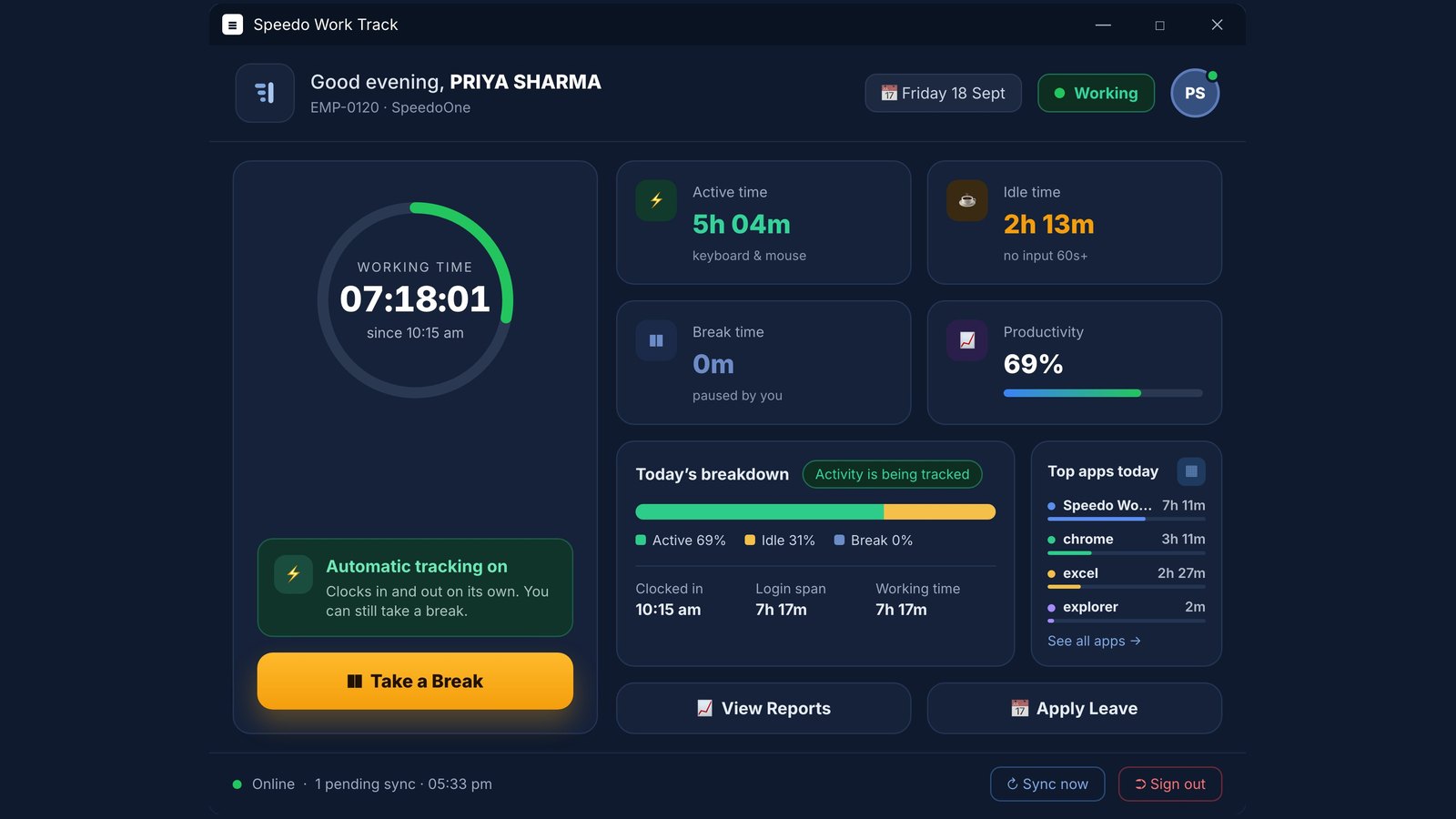
Screens from the working software. Names and numbers are sample data.চালু সফটওয়্যারের স্ক্রিন। নাম ও সংখ্যা নমুনা ডাটা।
Work TrackerWork Tracker
A punch at 9 and a punch at 6 say nothing about the hours between৯টায় পাঞ্চ, ৬টায় পাঞ্চ: মাঝের ঘণ্টাগুলোর হিসাব নেই
With fingerprints alone you know who came, not who worked. Remote and field staff have no record at all, month-end timesheets bring delay and argument, and reviews run on guesswork. Work Tracker fills that gap.শুধু ফিঙ্গারপ্রিন্টে জানা যায় কে এসেছে, কে কাজ করেছে জানা যায় না। রিমোট ও ফিল্ড স্টাফের কোনো হিসাব থাকে না, মাস শেষে টাইমশিটে দেরি আর তর্ক হয়, রিভিউ চলে অনুমানে। Work Tracker সেই ফাঁক ভরে।
Automatic clock-inঅটোমেটিক ক্লক-ইন
Tracking starts when the laptop starts. Nobody forgets to punch because there is no punch.ল্যাপটপ চালু হলেই ট্র্যাকিং শুরু। punch দিতেই হয় না, তাই কেউ ভুলে না।
Screenshots & timelapseস্ক্রিনশট ও টাইমল্যাপস
Captured at an interval, 600 seconds by default, with an hourly timelapse built automatically.নির্দিষ্ট ইন্টারভালে, ডিফল্ট ৬০০ সেকেন্ড, ক্যাপচার; ঘণ্টাভিত্তিক timelapse নিজে তৈরি হয়।
Top apps & websitesটপ অ্যাপ ও ওয়েবসাইট
Which app took how much of the day, with window-title recording optional.কোন অ্যাপে কত সময় গেছে, window title রেকর্ডিং ঐচ্ছিক।
One clear scoreএকটাই পরিষ্কার স্কোর
A daily productivity score that the employee and the manager both see.প্রতিদিনের productivity score, কর্মী ও ম্যানেজার দুজনেই দেখেন।
Attendance & late reportঅ্যাটেনডেন্স ও লেট রিপোর্ট
Present, Half day or Absent by hours worked, with your office time and grace minutes.কাজের ঘণ্টা দেখে Present, Half day বা Absent, আপনার অফিস টাইম ও grace minutes সহ।
Reports & CSVরিপোর্ট ও CSV
Any date range, present days and shortfall against target, in one click as CSV for payroll.যেকোনো ডেট রেঞ্জ, present days ও টার্গেটের ঘাটতি, এক ক্লিকে CSV, পে-রোলে সরাসরি।
Leave from the appঅ্যাপ থেকে ছুটি
The Apply Leave button sends the request and keeps the record.Apply Leave বাটনে আবেদন যায়, রেকর্ড থাকে।
Works offlineঅফলাইনেও চলে
Tracking continues without internet and syncs when the line returns.ইন্টারনেট না থাকলেও ট্র্যাকিং চলে, লাইন ফিরলে sync হয়।
Speedo HR integrationSpeedo HR ইন্টিগ্রেশন
Attendance, leave and payroll input in one place, so nothing is reconciled between two systems.হাজিরা, ছুটি আর পে-রোল ইনপুট একই জায়গায়, দুই সিস্টেম মেলাতে হয় না।
Typical usesসাধারণ ব্যবহার
How teams use it day to dayটিম প্রতিদিন কীভাবে ব্যবহার করে
Work Tracker is part of the Speedo One suite: one login and the same reports as HR, CRM and Accounting. Dupno GPS covers vehicles and field movement.Work Tracker Speedo One স্যুটের অংশ: HR, CRM ও Accounting-এর সাথে একই লগইন, একই রিপোর্ট। গাড়ি ও ফিল্ড মুভমেন্ট দেখে Dupno GPS।
Who is at the desk right nowএই মুহূর্তে কে ডেস্কে
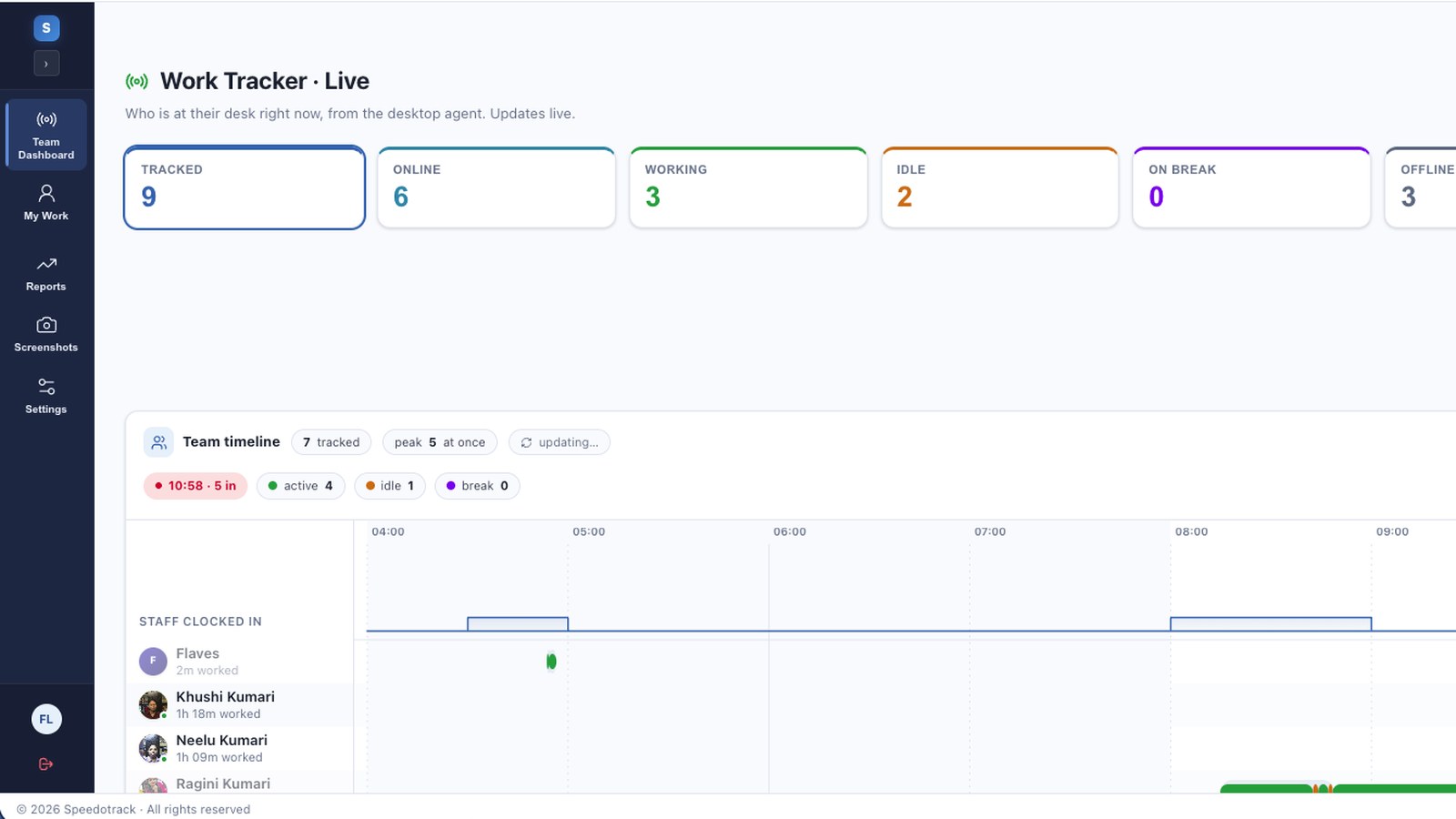
The live dashboard shows who is working, on a break, idle or offline, refreshed every 30 seconds from the desktop agent.লাইভ ড্যাশবোর্ড দেখায় কে working, break-এ, idle বা offline, ডেস্কটপ এজেন্ট থেকে ৩০ সেকেন্ড পরপর আপডেট।
A remote or field teamরিমোট বা ফিল্ড টিম
The laptop is tracked wherever it is: office, home or a client site.ল্যাপটপ যেখানেই থাকুক ট্র্যাক হয়: অফিস, বাসা বা ক্লায়েন্ট সাইট।
Month-end payrollমাস শেষে পে-রোল
Export the date-range report as CSV, or let the hours flow into Speedo HR, with no manual timesheet.ডেট-রেঞ্জ রিপোর্ট CSV-তে নিন বা ঘণ্টা Speedo HR-এ যেতে দিন, ম্যানুয়াল টাইমশিট ছাড়াই।
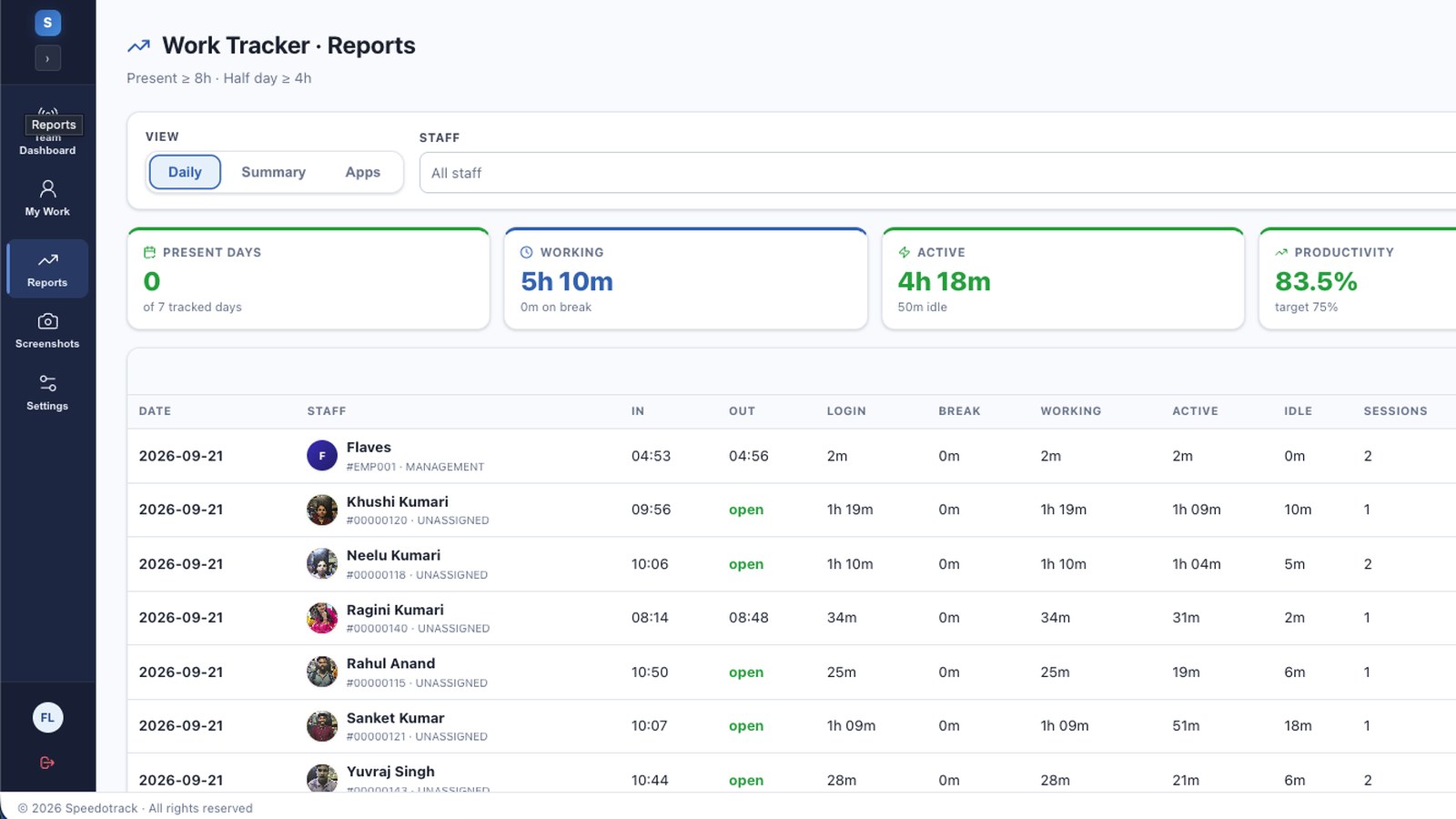

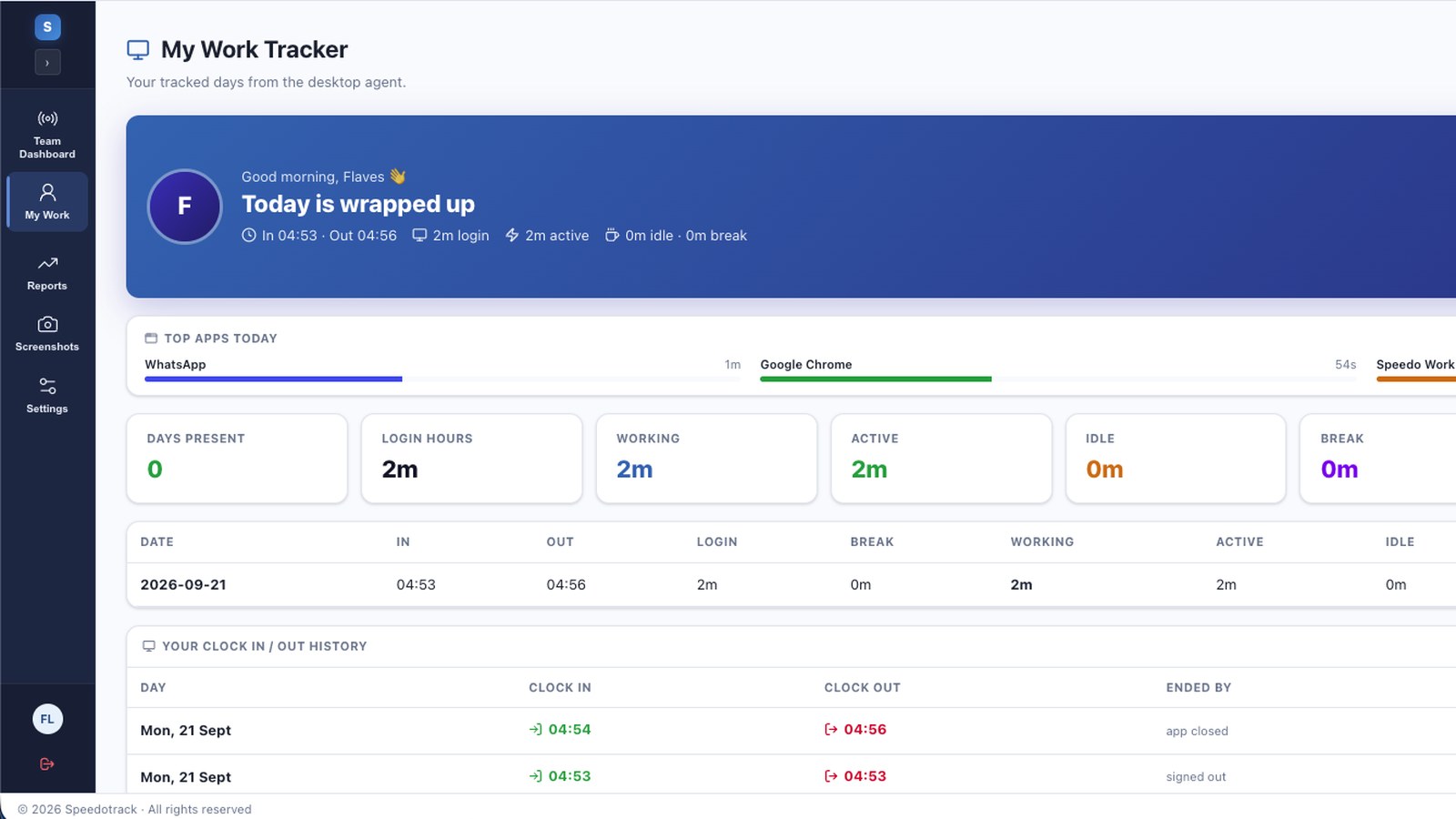
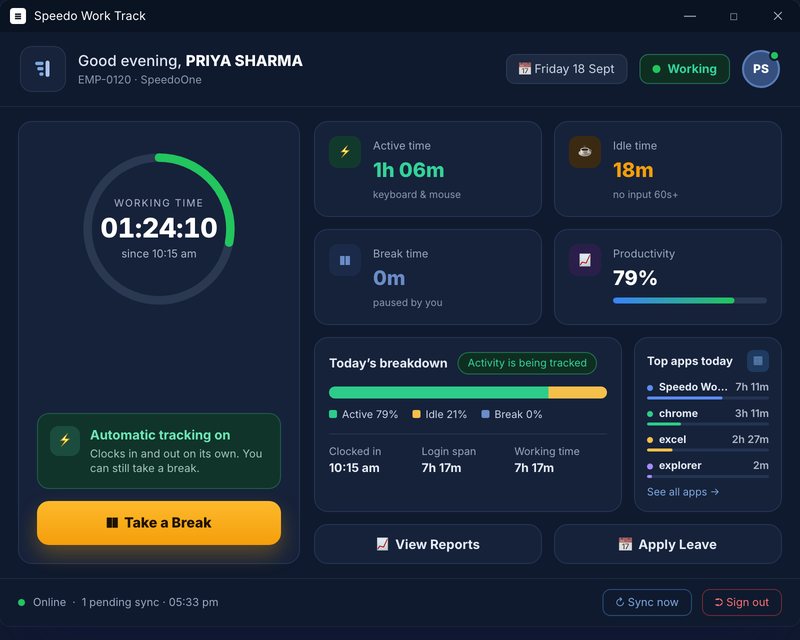
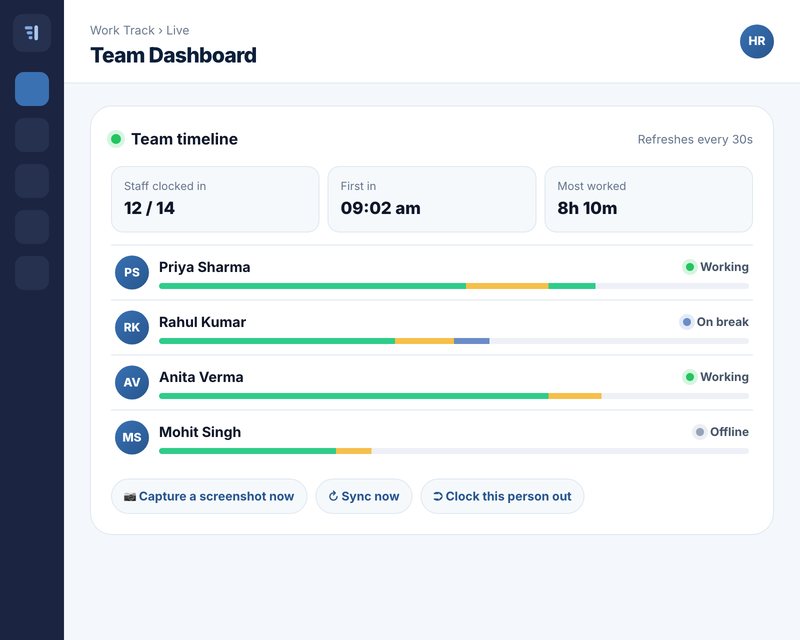
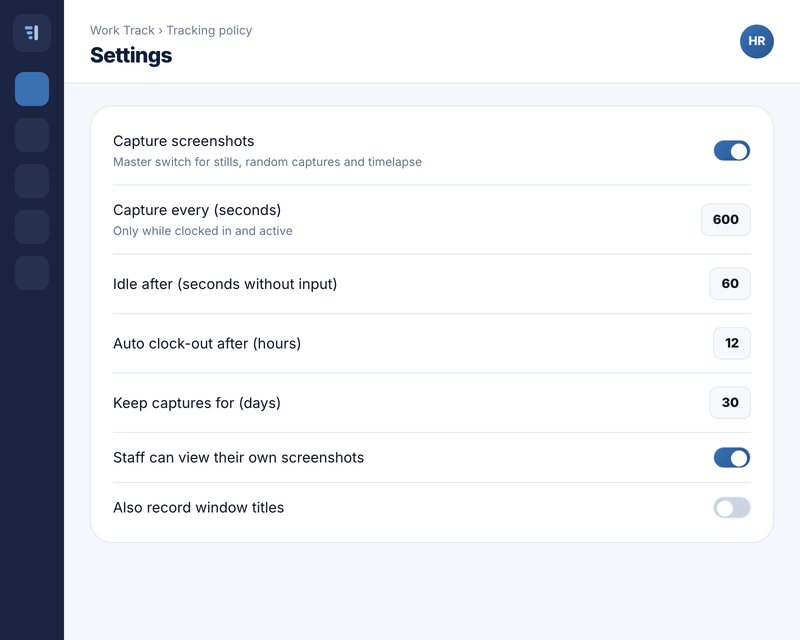
Screens from the working software. Names and numbers are sample data.চালু সফটওয়্যারের স্ক্রিন। নাম ও সংখ্যা নমুনা ডাটা।
How it measuresমাপার নিয়ম
The day is split into three, with no guessingদিনটাকে তিন ভাগে ভাগ করা হয়, অনুমান ছাড়াই
Reports, scores and attendance all come from these three states. Productivity score = the share of working time that was active. Example: 5h 04m active of 7h 17m working is 69%.রিপোর্ট, স্কোর, অ্যাটেনডেন্স সব এই তিন অবস্থা থেকে আসে। Productivity score = working time-এর কত অংশ active। যেমন ৭h ১৭m-এর মধ্যে ৫h ০৪m active হলে ৬৯%।
ActiveActive: Real workসত্যিকারের কাজ
Any keyboard or mouse input counts as active time. No guessing and no manual entry.কীবোর্ড বা মাউসের ইনপুট থাকলেই active time। আন্দাজ বা ম্যানুয়াল এন্ট্রি নয়।
IdleIdle: Away from the deskচেয়ার ফাঁকা
After 60 seconds with no input the time counts as idle. The admin can change the threshold.টানা ৬০ সেকেন্ড ইনপুট না পেলে সময়টা idle। থ্রেশহোল্ড অ্যাডমিন বদলাতে পারেন।
BreakBreak: A break you declareনিজের ঘোষণা দেওয়া বিরতি
Prayer, lunch or tea is one tap. It shows separately and does not mix with idle.নামাজ, লাঞ্চ বা চা এক ট্যাপে। আলাদা দেখায়, idle-এর সাথে মেশে না।
Transparencyস্বচ্ছতা
Monitoring is not surveillance, and the limits are clearমনিটরিং মানে নজরদারি নয়, সীমাটা স্পষ্ট
When the team knows what is recorded and what is not, the tool stops being a nuisance and becomes a record both sides can trust.টিম জানলে কী রেকর্ড হচ্ছে আর কী নয়, টুলটা ঝামেলা নয়, দুই পক্ষের ভরসার প্রমাণপত্র হয়ে যায়।
- Tracking runs only on company work devices, not on personal phones.ট্র্যাকিং চলে শুধু কোম্পানির ওয়ার্ক ডিভাইসে, কর্মীর ব্যক্তিগত ফোনে নয়।
- Screenshots are taken only while the employee is clocked in and active, never on a break or after clock-out.স্ক্রিনশট ওঠে কেবল কর্মী clocked in ও active থাকলে, break বা clock-out অবস্থায় নয়।
- Capture can be switched off completely. Nothing is taken unless the admin turns it on.ক্যাপচার পুরোপুরি বন্ধ রাখা যায়। অ্যাডমিন চালু না করলে একটাও ওঠে না।
- No keystroke logging. What is typed is not recorded.কীস্ট্রোক লগিং নেই। কী টাইপ করা হলো রেকর্ড হয় না।
- Captures are deleted after a set period, 30 days by default.ক্যাপচার নির্দিষ্ট মেয়াদ (ডিফল্ট ৩০ দিন) পরে মুছে যায়।
- Employees can see their own day, hours and captures. The admin decides the access.কর্মী নিজের দিন, ঘণ্টা ও ক্যাপচার দেখতে পারেন। অ্যাক্সেস অ্যাডমিন ঠিক করেন।
- Signed-in devices are listed and can be revoked.সাইন-ইন করা ডিভাইস তালিকায় দেখা যায়, দরকারে revoke করা যায়।
- We give you a written notice template to tell employees before roll-out.রোল-আউটের আগে কর্মীদের জানানোর লিখিত নোটিশ টেমপ্লেট আমরাই দিই।
Desktop agentডেস্কটপ এজেন্ট
It runs where the work happensযেখানে কাজ হয়, সেখানেই চলে
The manager and employee dashboards open in any browser with nothing to install. The agent needs an account that the Dupno team opens for you, so send a demo request first and then use the installer.ম্যানেজার ও কর্মীর ড্যাশবোর্ড যেকোনো ব্রাউজারে খোলে, ইনস্টল লাগে না। এজেন্টের জন্য অ্যাকাউন্ট লাগে যা Dupno টিম খুলে দেয়, তাই আগে ডেমো রিকোয়েস্ট পাঠান, তারপর ইনস্টলার কাজে লাগবে।
Tracking keeps running without internet. Records wait as pending and sync when the connection returns.ইন্টারনেট না থাকলেও ট্র্যাকিং চলে। রেকর্ড pending থেকে লাইন ফিরলে sync হয়।
Pricingপ্যাকেজ
৳300 per employee per month, nothing hiddenকর্মী প্রতি ৳৩০০ টাকা, মাসে, লুকানো খরচ নেই
Features are not sold separately. One licence for every employee you track.ফিচার আলাদা করে কিনতে হয় না। যতজন কর্মী, ততগুলো লাইসেন্স।
Free trialফ্রি ট্রায়াল
৳0 / 7 days৳০ / ৭ দিন- 7 days free for up to 5 users৫ জন পর্যন্ত ৭ দিন ফ্রি
- Every feature switched onসব ফিচার খোলা
- No card or advance neededকার্ড বা অগ্রিম লাগে না
- The Dupno team sets it upসেটআপ Dupno টিম করে দেয়
- Trial data stays if you go liveচালু করলে ট্রায়ালের ডাটা থেকে যায়
Standard
৳300 / employee / month৳৩০০ / কর্মী / মাস- Automatic clock-in, active, idle and breakঅটো ক্লক-ইন, active, idle ও break
- Screenshots and hourly timelapseস্ক্রিনশট ও ঘণ্টাভিত্তিক timelapse
- Live team dashboardলাইভ টিম ড্যাশবোর্ড
- Attendance policy and grace minutesঅ্যাটেনডেন্স পলিসি ও grace minutes
- Leave requests from the appঅ্যাপ থেকে ছুটির আবেদন
- Date-range reports and CSV exportডেট-রেঞ্জ রিপোর্ট ও CSV এক্সপোর্ট
- Phone and WhatsApp supportফোন ও হোয়াটসঅ্যাপ সাপোর্ট
Enterprise
By discussionআলোচনা সাপেক্ষে- 100+ employees১০০+ কর্মী
- Everything in StandardStandard-এর সব কিছু
- Speedo HR and Accounting integrationSpeedo HR ও Accounting ইন্টিগ্রেশন
- A dedicated account managerডেডিকেটেড অ্যাকাউন্ট ম্যানেজার
- On-site roll-out and trainingঅন-সাইট রোল-আউট ও ট্রেনিং
- Custom reports and SLAকাস্টম রিপোর্ট ও SLA
Example: a team of 25 is 25 × ৳300 = ৳7,500 a month. Ask our sales team about annual contracts and discounts for larger teams.উদাহরণ: ২৫ জনের টিম → ২৫ × ৳৩০০ = ৳৭,৫০০ / মাস। বার্ষিক চুক্তি ও বড় টিমের ছাড়ের জন্য সেলস টিমের সাথে কথা বলুন।
Getting startedশুরু করা
Live in three stepsতিন ধাপে চালু
Free demoফ্রি ডেমো
Tell us your team size and how you work today. We show the module on your own workflow.টিমের আকার আর এখন কীভাবে কাজ করেন বলুন। আপনার নিজের কাজের ধরনে মডিউলটা দেখাই।
Setup and data importসেটআপ ও ডাটা ইমপোর্ট
We create users, set your policies and import your data from Excel, so you do not start from zero.আমরা ইউজার বানাই, পলিসি সেট করি আর Excel থেকে ডাটা ইমপোর্ট করি, আপনাকে শূন্য থেকে শুরু করতে হয় না।
Training and go-liveট্রেনিং ও চালু
We train your team and stay on call in Bangla, by phone, WhatsApp or a visit.আমরা আপনার টিমকে ট্রেনিং দিই আর বাংলায় পাশে থাকি, ফোন, হোয়াটসঅ্যাপ বা ভিজিটে।
Part of the suiteস্যুটের অংশ
Connects to the rest of Speedo OneSpeedo One-এর বাকিটার সাথে যুক্ত
Why Dupnoকেন Dupno
Set up, billed and supported locallyসেটআপ, বিল আর সাপোর্ট দেশেই
Taka contract and invoiceটাকায় চুক্তি ও ইনভয়েস
No dollar card payment. Price quoted in Bangladeshi taka.ডলারে কার্ড পেমেন্ট নয়। দাম বাংলাদেশি টাকায় কোটেশন।
Setup, import and trainingসেটআপ, ইমপোর্ট ও ট্রেনিং
We set it up with your data and train your team.আপনার ডাটা দিয়ে সেটআপ করি আর টিমকে ট্রেনিং দিই।
Support in Banglaবাংলায় সাপোর্ট
Phone, WhatsApp or a visit. Hotline 09642500400.ফোন, হোয়াটসঅ্যাপ বা ভিজিট। হটলাইন 09642500400।
Speedo One is a joint venture of Dupno International Limited and Speedo One. Want the global product page?Speedo One হলো Dupno International Limited ও Speedo One-এর যৌথ উদ্যোগ। গ্লোবাল প্রোডাক্ট পেজ দেখতে চান? speedoone.com
FAQপ্রশ্নোত্তর
Questions, answeredপ্রশ্নোত্তর
How much does it cost?দাম কত পড়বে?
৳300 per employee per month with every feature, for example ৳7,500 a month for 25 people. There is a 7-day free trial for up to 5 users with no card or advance. Teams of 100+ get a separate package.কর্মী প্রতি মাসে ৳৩০০ টাকা, সব ফিচার সহ, যেমন ২৫ জনের টিমে মাসে ৳৭,৫০০। ৫ জন পর্যন্ত ৭ দিনের ফ্রি ট্রায়াল আছে, কার্ড বা অগ্রিম লাগে না। ১০০+ কর্মী হলে আলাদা প্যাকেজ।
What do I get in the free trial?ফ্রি ট্রায়ালে কী কী পাব?
Up to 5 users for 7 days with every feature open: screenshots, live dashboard and reports. The Dupno team sets it up, and if you decide to go live the trial data stays.৭ দিনের জন্য ৫ জন ইউজার পর্যন্ত সব ফিচার খোলা: স্ক্রিনশট, লাইভ ড্যাশবোর্ড, রিপোর্ট সব। সেটআপ Dupno টিম করে দেয়, চালু করলে ট্রায়ালের ডাটা থেকে যায়।
What counts as active time?Active time আসলে কী হিসেবে ধরা হয়?
Any time with keyboard or mouse input on the computer is active time.কম্পিউটারে কীবোর্ড বা মাউসের ইনপুট যতক্ষণ থাকে, ততক্ষণই active time।
When is time counted as idle?কখন সময়টা idle গোনা হয়?
By default after 60 seconds or more with no keyboard or mouse input. The admin can change the threshold.ডিফল্টে টানা ৬০ সেকেন্ড বা তার বেশি কীবোর্ড-মাউস ইনপুট না থাকলে। থ্রেশহোল্ড অ্যাডমিন বদলাতে পারেন।
How is the productivity score worked out?Productivity স্কোর কীভাবে হিসাব হয়?
It is the share of working time that was active. For example 5h 04m active in 7h 17m of working time is 69%.working time-এর কত অংশ active ছিল সেটাই স্কোর। যেমন ৭ঘ ১৭মি working-এর মধ্যে ৫ঘ ০৪মি active হলে ৬৯%।
Do employees have to clock in and out each day?কর্মীকে কি রোজ clock in / out করতে হবে?
No. The app clocks in and out by itself. Only a break needs one tap.না। অ্যাপ নিজেই ক্লক-ইন ও ক্লক-আউট করে। শুধু break নিতে এক ট্যাপ লাগে।
Are screenshots taken all the time?স্ক্রিনশট কি সবসময় ওঠে?
No. They are taken only if the admin switches capture on, and only while the employee is clocked in and active. The default interval is 600 seconds, and random capture can be added.না। অ্যাডমিন ক্যাপচার চালু করলে তবেই ওঠে, আর কেবল কর্মী clocked in ও active থাকলে। ডিফল্ট ইন্টারভাল ৬০০ সেকেন্ড, চাইলে র্যান্ডম ক্যাপচারও যোগ করা যায়।
How is Present or Absent decided?Present না Absent কীভাবে ঠিক হয়?
By hours worked in the day. The admin sets the hours target, office time and grace minutes, and the result is Present, Half day or Absent.দিনে কত ঘণ্টা কাজ হয়েছে তার ভিত্তিতে। ঘণ্টার টার্গেট, অফিস টাইম আর grace minutes অ্যাডমিন সেট করেন, ফল হয় Present, Half day বা Absent।
What does a manager see?ম্যানেজার কী কী দেখেন?
A live team dashboard of who is working, on a break or offline, a team timeline, reports for any date range with CSV export, and each employee’s screenshots and timelapse.কে Working, কে On break, কে Offline তার লাইভ টিম ড্যাশবোর্ড, টিম টাইমলাইন, যেকোনো ডেট রেঞ্জের রিপোর্ট ও CSV এক্সপোর্ট, আর প্রতিটি কর্মীর স্ক্রিনশট ও timelapse।
What happens if the internet goes down?ইন্টারনেট গেলে কী হয়?
Tracking keeps running. Records wait as pending and sync when the connection returns, or immediately with Sync now.ট্র্যাকিং চলতেই থাকে। রেকর্ড pending থাকে, লাইন ফিরলে নিজে থেকে বা Sync now চাপলে সাথে সাথে sync হয়।
Which devices does it run on?কোন ডিভাইসে চলে?
Windows 64-bit and Mac, both Apple silicon and Intel, version 0.4.4. The manager and employee dashboards open in any browser. After installing, sign in to your company account, which the Dupno team opens for you.Windows (64-bit) এবং Mac (Apple silicon ও Intel), দুটোরই v0.4.4। ম্যানেজার ও কর্মীর ড্যাশবোর্ড যেকোনো ব্রাউজারে খোলে। ইনস্টলের পর কোম্পানির অ্যাকাউন্টে সাইন ইন লাগে, সেটি Dupno টিম খুলে দেয়।
What is the relationship between Dupno and Speedo One?Dupno-র সাথে Speedo One-এর সম্পর্ক কী?
Speedo One is a joint venture and development partnership with Dupno. In Bangladesh, sales, implementation, billing and support are all handled by Dupno, so your contract, invoice and support tickets stay local.Speedo One Dupno-র যৌথ উদ্যোগ ও ডেভেলপমেন্ট পার্টনারশিপ। বাংলাদেশে বিক্রয়, ইমপ্লিমেন্টেশন, বিলিং ও সাপোর্ট সবই Dupno-র, আপনার চুক্তি, ইনভয়েস আর সাপোর্ট টিকেট স্থানীয়ভাবে Dupno দেখে।
Can it run without telling employees?কর্মীদের না জানিয়ে চালানো যাবে?
We do not recommend it. We give you a Bangla notice template to share before roll-out, and teams that know what is recorded accept the tool far more easily.আমরা সেটা সুপারিশ করি না। রোল-আউটের আগে জানানোর জন্য বাংলা নোটিশ টেমপ্লেট দিই, টিম জানলে টুলটির গ্রহণযোগ্যতা অনেক বাড়ে।
Price calculatorপ্রাইস ক্যালকুলেটর
Build your own planনিজের প্ল্যান নিজে বানান
Pick your companies, choose only the modules you need, set users per module and see the monthly cost. No module is compulsory.কোম্পানি বাছুন, শুধু যে মডিউল লাগবে সেটা নিন, প্রতিটিতে ইউজার সংখ্যা দিন, মাসিক খরচ দেখুন। কোনো মডিউল বাধ্যতামূলক নয়।
Step 1. Business structureধাপ ১. ব্যবসার কাঠামো
Step 2 and 3. Modules and users per companyধাপ ২ ও ৩. কোম্পানিভিত্তিক মডিউল ও ইউজার
Step 4. Monthly estimateধাপ ৪. মাসিক হিসাব
Estimate only. A user is counted once for each module and once for each company. Real billing follows the active users in each billing period. The 10% online checkout discount is already applied. Storage and VAT are confirmed in your quote.এটি আনুমানিক হিসাব। একজন ইউজার প্রতিটি মডিউলে আর প্রতিটি কোম্পানিতে আলাদা করে গণনা হয়। আসল বিল প্রতিটি বিলিং সময়ের সক্রিয় ইউজার অনুযায়ী। ১০% অনলাইন চেকআউট ছাড় ধরা হয়েছে। স্টোরেজ ও VAT কোটেশনে নিশ্চিত করা হয়।
Tell us your team size, we will tell you where to startটিমের আকার বলুন, কোনটা দিয়ে শুরু করবেন আমরা বলে দেব
Send a request and the Dupno team will call you within 24 hours. We set it up, train your team and support you in Bangla. Work Tracker has a 7-day free trial for 5 users.রিকোয়েস্ট পাঠান, ২৪ ঘণ্টার মধ্যে Dupno টিম কল করবে। সেটআপ, ট্রেনিং আর বাংলায় সাপোর্ট আমরা দিই। Work Tracker-এ ৫ জন নিয়ে ৭ দিনের ফ্রি ট্রায়াল আছে।
- Salesসেলস: 09642500400
- Emailইমেইল: info@dupno.com
Fill in two fields and we will call you back.দুটো ঘর পূরণ করুন, আমরাই কল করব।
We have your details. The Dupno team will call you within 24 hours.আপনার তথ্য পেয়েছি। ২৪ ঘণ্টার মধ্যে Dupno টিম কল করবে।